Файловый менеджер - Редактировать - /home/gqdcvggs/imators.com/node_modules/gradient-string/README.md
Назад
# gradient-string [![Build Status][build-src]][build-href] [![Version][version-src]][version-href] [![Codecov][codecov-src]][codecov-href] [![Downloads][downloads-src]][downloads-href] [![code style: prettier][code-style-src]][code-style-href] [![Mentioned in Awesome Node.js][awesome-src]][awesome-href] > Beautiful color gradients in terminal output [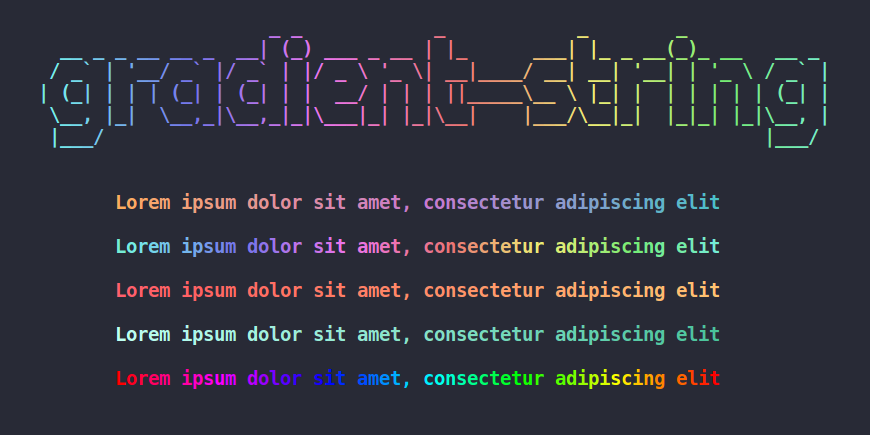](http://bit.ly/gradient-string-large) ## Install ``` $ npm i gradient-string ``` ## Usage ```javascript import gradient from 'gradient-string'; console.log(gradient(['cyan', 'pink'])('Hello world!')); ``` ### Initialize a gradient ```javascript // Provide an array of colors const coolGradient = gradient(['#FF0000', '#00FF00', '#0000FF']); ``` The colors are parsed with TinyColor, [multiple formats are accepted](https://github.com/bgrins/TinyColor/blob/master/README.md#accepted-string-input). ```javascript const coolGradient = gradient([ tinycolor('#FFBB65'), // tinycolor object { r: 0, g: 255, b: 0 }, // RGB object { h: 240, s: 1, v: 1, a: 1 }, // HSVa object 'rgb(120, 120, 0)', // RGB CSS string 'gold', // named color ]); ``` ### Use a gradient ```javascript const coolString = coolGradient('This is a fancy string!'); console.log(coolString); ``` ## Built-in gradients ### Usage ```javascript import { rainbow, pastel } from 'gradient-string'; // Use the pastel built-in gradient console.log(pastel('I love gradient-string!')); // Use the rainbow built-in gradient console.log(rainbow('It is so pretty! 🌈')); ``` ### Available built-in gradients [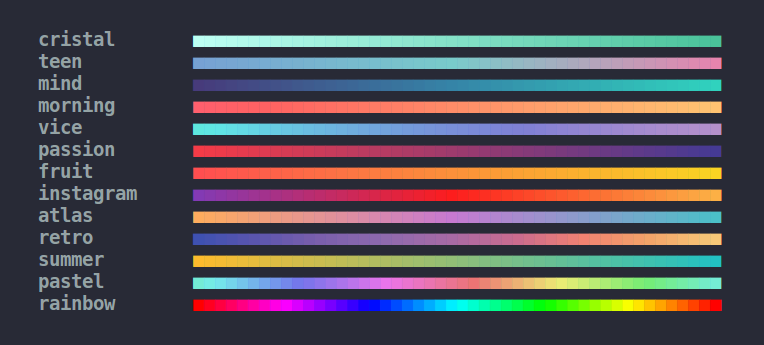](http://bit.ly/2ufX07r) ## Multi line gradients In some cases, you may want to apply the same horizontal gradient on each line of a long text (or a piece of ASCII art). You can use the `multiline()` method of a gradient to ensure that the colors are vertically aligned. ```javascript import gradient, { rainbow } from 'gradient-string'; // Use the same gradient on every line const duck = gradient(['green', 'yellow']).multiline(` __ <(o )___ ( ._> / --- `); console.log(duck); // Works with aliases rainbow.multiline('Multi line\nstring'); // Works with advanced options (read below) gradient(['cyan', 'pink'], { interpolation: 'hsv' }).multiline('Multi line\nstring'); ``` ## Advanced gradients There are also more advanced options for gradient customization, such as custom color stops, or choice of color interpolation ### Custom color stops By default, the gradient color stops are distributed equidistantly. You can specify the position of each color stop (between `0` and `1`), using the following syntax: ```javascript let coolGradient = gradient([ { color: '#d8e0de', pos: 0 }, { color: '#255B53', pos: 0.8 }, { color: '#000000', pos: 1 }, ]); ``` ### Color interpolation When creating a gradient, you can provide a second parameter to choose how the colors will be generated. Here is the full `gradient` API: #### `gradient([colors], options?)(text)` ##### colors Type: `Array<Color>`<br> Colors of the gradient. [Multiple formats are accepted](https://github.com/bgrins/TinyColor/blob/master/README.md#accepted-string-input). ##### text Type: `String`<br> String you want to color. ##### options Type: `Object` _(optional)_<br> ###### interpolation Type: `string`<br> The gradient can be generated using RGB or HSV interpolation. HSV usually produces brighter colors. `interpolation` can be set to `rgb` for RGB interpolation, or`hsv` for HSV interpolation.<br> Defaults to `rgb`. Case-insensitive ###### hsvSpin Type: `string`<br> Used only in the case of HSV interpolation.<br> Because hue can be considered as a circle, there are two ways to go from a color to another color.<br> `hsvSpin` can be either `short` or `long`, depending on if you want to take the shortest or the longest way between two colors.<br> Defaults to `short`. Case-insensitive #### Example ##### Code ```javascript const str = '■'.repeat(48); // Standard RGB gradient const standardRGBGradient = gradient(['red', 'green']); // Short HSV gradient: red -> yellow -> green const shortHSVGradient = gradient(['red', 'green'], { interpolation: 'hsv' }); // Long HSV gradient: red -> magenta -> blue -> cyan -> green const longHSVGradient = gradient(['red', 'green'], { interpolation: 'hsv', hsvSpin: 'long' }); console.log(standardRGBGradient(str)); console.log(shortHSVGradient(str)); console.log(longHSVGradient(str)); ``` ##### Result  ## Dependencies - [chalk](https://github.com/chalk/chalk) - Output colored text to terminal - [tinygradient](https://github.com/mistic100/tinygradient) - Generate gradients ## Who uses gradient-string? - [Shopify](https://shopify.com/) in [Shopify CLI](https://www.npmjs.com/package/@shopify/cli-kit?activeTab=dependencies#:~:text=gradient&text=string) - [Microsoft](https://microsoft.com) in [@lage-run/reporters](https://www.npmjs.com/package/@lage-run/reporters?activeTab=dependencies#:~:text=gradient&text=string) - [Tencent](https://www.tencent.com/) in [Cloudbase Framework](https://www.npmjs.com/package/@cloudbase/framework-core#:~:text=gradient&text=string) - [Fireship](https://fireship.io/) in [this YouTube video](https://youtu.be/_oHByo8tiEY?si=3AKfAfOMXI0d9Ay6&t=76), where he shows how he built [javascript-millionaire](https://github.com/fireship-io/javascript-millionaire) - [Turoborepo](https://turbo.build/) in [@turbo/workspaces](https://www.npmjs.com/package/@turbo/workspaces?activeTab=dependencies#:~:text=gradient&text=string) and [@turbo/codemod](https://www.npmjs.com/package/@turbo/codemod?activeTab=dependencies#:~:text=gradient&text=string) - [Magic UI](https://magicui.design/) in [Magic UI CLI](https://www.npmjs.com/package/magicui-cli?activeTab=dependencies) - [Myself](https://github.com/bokub) in [chalk-animation](https://github.com/bokub/chalk-animation), the animated version of gradient-string - [Sindre Sorhus](https://github.com/sindresorhus) in [ink-gradient](https://www.npmjs.com/package/ink-gradient?activeTab=dependencies#:~:text=gradient&text=string), the [Ink](https://github.com/vadimdemedes/ink) version of gradient-string - [And  more...](https://github.com/bokub/gradient-string/network/dependents), who downloaded gradient-string [ times!][downloads-href] ## License MIT © [Boris K](https://github.com/bokub) [build-src]: https://flat.badgen.net/github/checks/bokub/gradient-string?label=tests [version-src]: https://gradgen.bokub.workers.dev/npm/v/gradient-string?gradient=b65cff,11cbfa&style=flat&label=version [codecov-src]: https://img.shields.io/codecov/c/github/bokub/rgb-light-card?style=flat-square [downloads-src]: https://flat.badgen.net/npm/dw/gradient-string?color=FF9800 [code-style-src]: https://flat.badgen.net/badge/code%20style/prettier/ff69b4 [awesome-src]: https://awesome.re/mentioned-badge-flat.svg [build-href]: https://github.com/bokub/gradient-string/actions/workflows/run.yml [version-href]: https://www.npmjs.com/package/gradient-string [codecov-href]: https://codecov.io/gh/bokub/gradient-string [downloads-href]: https://www.npmjs.com/package/gradient-string [code-style-href]: https://github.com/bokub/prettier-config [awesome-href]: https://github.com/sindresorhus/awesome-nodejs
| ver. 1.6 |
Github
|
.
| PHP 8.1.33 | Генерация страницы: 0 |
proxy
|
phpinfo
|
Настройка